
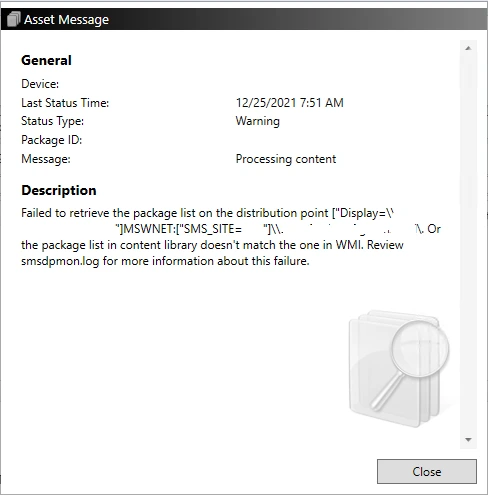
When reviewing the deployment status of packages on your Distribution Points (DPs), you may encounter the following warning:
“Failed to retrieve the package list on the distribution point”
This article explains the root cause of this warning and provides two methods to resolve it.
What Causes This Warning?
A Distribution Point maintains two separate package inventories:
- WMI Package List – Stored in Windows Management Instrumentation (WMI), this list contains the packages registered on the Distribution Point.
- PkgLib Package List – Stored in the PkgLib folder within the Distribution Point Content Library, this list contains the corresponding package definition files.
These two lists must always remain synchronized.
The warning appears whenever they become inconsistent. The most common scenarios are:
- A package exists in WMI but is missing from PkgLib.
- A package exists in PkgLib but is missing from WMI.
- A package referenced on the Distribution Point no longer exists in the primary package list on the Site Server (typically after an application or package has been deleted).
These inconsistencies create orphaned Package IDs that must be cleaned up to restore proper synchronization.
How to Fix “Failed to Retrieve the Package List on the Distribution Point”
Option 1 – Use ContentLibraryCleanup.exe
Starting with Configuration Manager Current Branch 2010, Microsoft provides ContentLibraryCleanup.exe, which can automatically remove orphaned WMI entries from Distribution Points.
Microsoft documents the tool in its official documentation, and we also cover it in our dedicated article on cleaning up Distribution Points.
Option 2 – Use the Following PowerShell Script
The following PowerShell script compares the WMI package list with the PkgLib package list and allows you to remove inconsistent entries.
# Retrieve packages registered in WMI
$WMIPkgList = Get-WmiObject -Namespace Root\SCCMDP -Class SMS_PackagesInContLib | Select -ExpandProperty PackageID | Sort-Object

# Retrieve the Content Library path
$ContentLib = (Get-ItemProperty HKLM:SOFTWARE\Microsoft\SMS\DP).ContentLibraryPath
$PkgLibPath = "$ContentLib\PkgLib"

# Retrieve packages stored in PkgLib
$PkgLibList = (Get-ChildItem $PkgLibPath | Select -ExpandProperty Name | Sort-Object)
$PkgLibList = ($PkgLibList | ForEach-Object { $_.replace(".INI", "") })

# Compare both lists
$PksinWMIButNotContentLib = Compare-Object -ReferenceObject $WMIPkgList -DifferenceObject $PkgLibList -PassThru
$PksinContentLibButNotWMI = Compare-Object -ReferenceObject $PkgLibList -DifferenceObject $WMIPkgList -PassThru

# Remove packages present in WMI but missing from the Content Library
Write-Host "Items in WMI but not in Content Library" -ForegroundColor Cyan
$PksinWMIButNotContentLib
Foreach ($Pkg in $PksinWMIButNotContentLib) {
    Get-WmiObject -Namespace Root\SCCMDP -Class SMS_PackagesInContLib -Filter "PackageID = '$Pkg'" | Remove-WmiObject -Confirm
}

# Remove packages present in the Content Library but missing from WMI
Write-Host "Items in Content Library but not in WMI" -ForegroundColor Cyan
$PksinContentLibButNotWMI
Foreach ($Pkg in $PksinContentLibButNotWMI) {
    Remove-Item -Path "$PkgLibPath\$Pkg.INI" -Confirm
}
Validate the Fix
After running the cleanup script, it is recommended to perform a Content Validation from the Configuration Manager console.
This forces SCCM to resynchronize the package information and confirms that the inconsistency has been resolved.
Conclusion
Although the warning “Failed to retrieve the package list on the distribution point” is not considered critical, it should not be ignored.
Cleaning orphaned Package IDs helps maintain a healthy SCCM infrastructure, ensures proper Distribution Point synchronization, and prevents future content deployment issues.
Whether you choose ContentLibraryCleanup.exe or the PowerShell script above, both approaches provide an effective way to restore consistency between WMI and the Content Library.