

When manually installing a Windows update file (.msu), you may encounter error 0x800f0823 with the following message:
Error 0x800f0823 – “The Windows Modules Installer must be updated before you can install this package.”
This message indicates that your system does not have a recent enough version of the Servicing Stack Update (SSU), a required component for processing .msu update packages.
Understanding the Error
This error does not typically occur when updates are installed through Windows Update, because Windows Update automatically manages dependencies such as the SSU.
It mainly appears during:
- Manual update installations
- Script-based deployments
- Package-based deployments (SCCM, MECM, Intune Win32 packages, etc.)
The SSU is a critical system component required for the proper operation of:
- DISM
- Windows Update
- Cumulative Updates (CU)
Without the appropriate Servicing Stack Update, Windows cannot process certain update packages correctly.
Step 1: Check Installed Updates
Before troubleshooting error 0x800f0823, verify whether a recent SSU is already installed.
Using PowerShell:
Get-WmiObject -Class Win32_QuickFixEngineering |
Sort-Object -Property InstalledOn |
Format-Table -AutoSize
Look for KB entries containing “Servicing Stack” in their description.
Step 2: Identify the Correct SSU Version
- Determine your Windows version:
systeminfo | findstr /B /C:"OS Name" /C:"OS Version"-
Visit the Microsoft Update Catalog.
-
Search for:
Servicing Stack Update <your Windows version>- Filter the results according to:
- Architecture (x64, ARM64, x86)
- Most recent release date
- Exact Windows version (for example: 21H2, 22H2, 23H2, etc.)
- Download the matching
.msupackage.
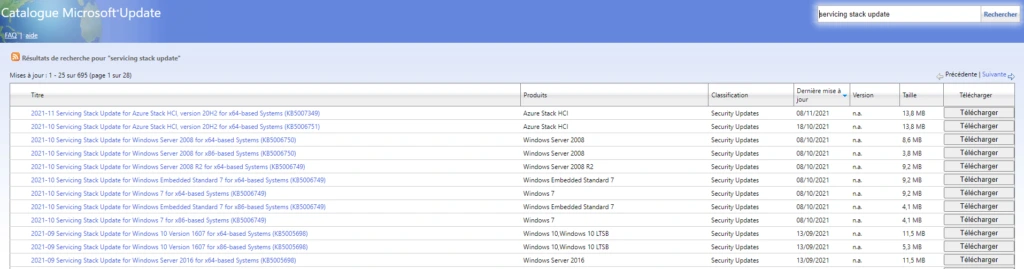
Step 3: Install the SSU and the Update Using DISM
Once the appropriate SSU package has been downloaded:
Install the SSU using DISM:
dism /online /add-package /packagepath:"C:\PackagePath\windows10.0-ssu-kbxxxxxxx.msu"Then install the update you originally intended to deploy:
dism /online /add-package /packagepath:"C:\PackagePath\cumulative-update-kbxxxxxxx.msu"✅ Installation Order
When installing multiple .msu files, always install the Servicing Stack Update (SSU) first, followed by the Cumulative Update (CU).
Important Considerations
- Do not mix Windows versions. An SSU designed for Windows 10 21H1 will not work on a device running 22H2.
- If the error persists, restart the device after installing the SSU and try installing the update again.
- You can verify successful installation using DISM:
dism /online /get-packagesError 0x800f0823: Conclusion
Error 0x800f0823 is directly related to an outdated or missing Servicing Stack Update (SSU).
Whenever a manual Windows update installation fails with this error, your first troubleshooting step should be to verify that the latest applicable SSU is installed on the device.
In enterprise environments, this issue is most commonly encountered during offline update deployments, SCCM/MECM package installations, or custom update automation processes. Ensuring that the Servicing Stack is up to date can prevent a significant number of update installation failures.