

When starting an SCCM task sequence (for example, OS deployment or image deployment), the process may fail with error code 0x800700A1 and the following message:
0x800700A1 – The specified path is invalid
This error typically occurs very early in the task sequence, often while downloading the packages required for execution. It is generally related to a disk partitioning issue on the target device.
Cause of Error 0x800700A1
This error is caused by the absence of a valid partition or a recognized file system on the hard drive.
- The system attempts to mount a volume to store task sequence files, but no usable volume is available.
- In some cases, the disk may contain corrupted partitions, an unknown file system, or may not have been properly wiped.
Manual Workaround (Temporary Troubleshooting)
If you are testing or facing a production-blocking issue, you can perform a quick manual disk cleanup.
Steps
- When the error appears, press
F8to open a command prompt (WinPE command support must be enabled). - Run the following commands:
diskpart
list disk
select disk 0
clean
create partition primary
select partition 1
format fs=ntfs quick
assign letter=c
active
exit- Return to the SCCM interface, click Previous several times, and restart the task sequence.
Important
💡 This workaround erases all data on Disk 0. Use it only if you are certain that no critical data will be lost.
Long-Term Solution: Fix the SCCM Task Sequence
To prevent this error from occurring again, ensure that the disk is properly prepared before any other task sequence actions are executed.
Recommended Configuration
-
Edit your SCCM task sequence.
-
Add a Format and Partition Disk step:
- Disk: 0
- Partition Style: BIOS or UEFI (depending on your environment)
- Create a primary system partition formatted as NTFS
-
Apply the following conditions to the step:
Condition 1: Run only in WinPE
Task Sequence Variable: SMSTSInWinPE = TrueCondition 2: Run only when no valid volume is detected
SELECT * FROM Win32_Volume WHERE DriveLetter <> 'X:'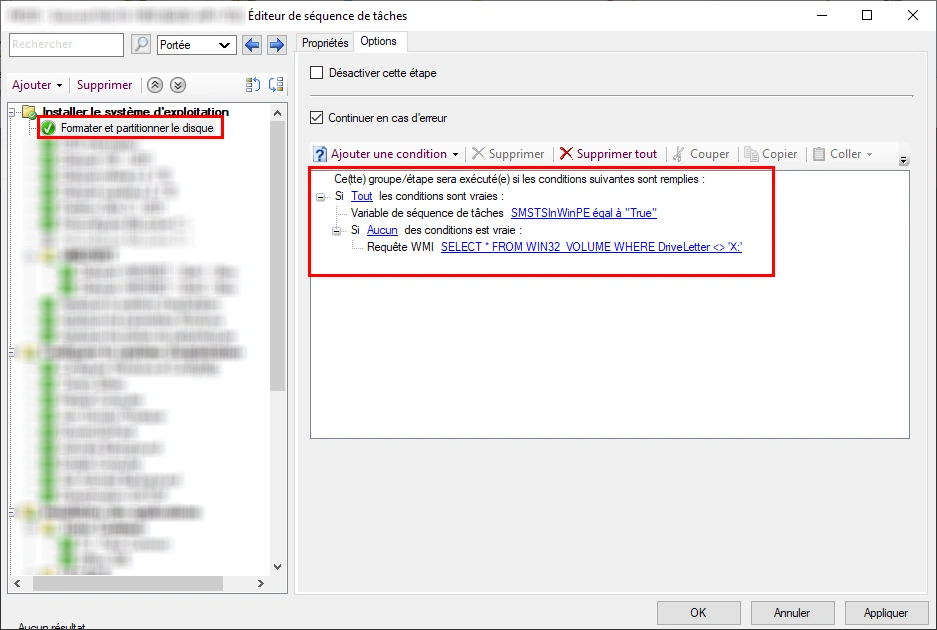
Important
📌 These two conditions help prevent formatting a disk that has already been configured, particularly during refresh or in-place deployment scenarios.
Best Practices
- Add custom logging (via PowerShell or scripts) to capture disk-related issues.
- Enable the F8 command prompt in WinPE to simplify troubleshooting.
- Use a PowerShell disk analysis script to generate a pre-deployment report.
- Favor a conditional task sequence rather than systematic formatting in hybrid deployment scenarios (such as refresh or conditional wipe-and-load deployments).
Error 0x800700A1: Conclusion
Error 0x800700A1 is a common SCCM task sequence issue when deploying to disks that have not been properly initialized.
Fortunately, it can be resolved easily:
- Either through manual troubleshooting using DiskPart
- Or, preferably, by implementing a conditional disk formatting step within your SCCM task sequences
This approach ensures a more reliable deployment process, supports a wider range of deployment scenarios, and aligns with enterprise security and operational best practices.