
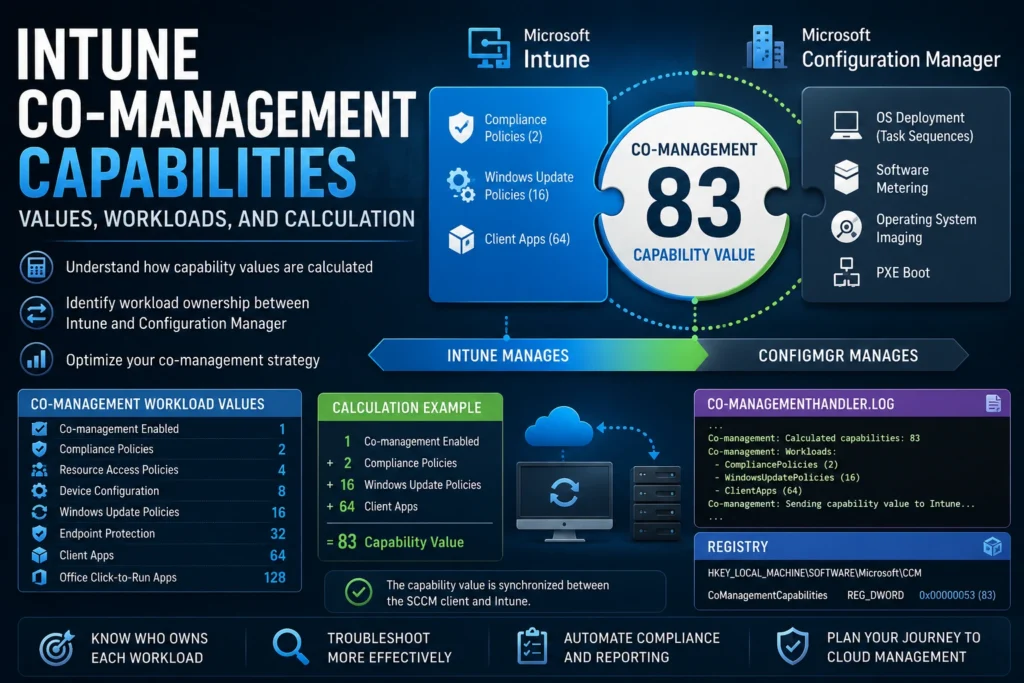
When configuring Co-Management between Microsoft Intune and Microsoft Configuration Manager (SCCM/MECM), understanding Capabilities is essential. These numeric values determine which workloads are managed by Intune, Configuration Manager, or shared between both platforms.
What Is a Capability in Co-Management?
Capabilities are integer values ranging from 1 to 255. They are dynamically calculated based on which workloads have been assigned to Intune.
- Value 1: All workloads are managed by Configuration Manager only.
- Value 255: All workloads are managed by Intune only.
- Any value between 1 and 255: A hybrid configuration where workloads are split between Configuration Manager and Intune.
💡 If a client reports a capability value of 1 or 255, it is not truly operating in co-management because all workloads are controlled by a single management platform.
Where Can You Find the Capability Value?
You can retrieve the capability value from several locations:
- Windows Registry:
HKEY_LOCAL_MACHINE\SOFTWARE\Microsoft\CCM - SCCM SQL Database (
v_ClientCoManagementState) - CoManagementHandler.log
- WMI:
root\ccm\cimodels(class:SMS_ClientCoManagementState) - Configuration Manager Control Panel Applet → Co-management (or General) tab
How Is the Capability Value Calculated?
Each workload corresponds to a binary value. The capability value is simply the sum of all workloads currently managed by Intune.
| Workload | Value |
|---|---|
| Co-management Enabled | 1 |
| Compliance Policies | 2 |
| Resource Access Policies | 4 |
| Device Configuration | 8 |
| Windows Update Policies | 16 |
| Endpoint Protection | 32 |
| Client Apps | 64 |
| Office Click-to-Run Apps | 128 |
Calculation Example
Suppose you enable Co-Management and move the following workloads to Intune:
- Client Apps → 64
- Windows Update Policies → 16
- Compliance Policies → 2
The capability value becomes:
1   (Co-management enabled)
2   (Compliance Policies)
16  (Windows Update Policies)
64  (Client Apps)
----------------------------
83
This value is stored locally and synchronized with Intune. Both the SCCM client and Intune use it to determine which workloads they should manage and which they should ignore.
What Happens When the Capability Value Changes?
Whenever an administrator moves workloads between Configuration Manager and Intune:
- The SCCM client updates its internal workload configuration.
- An immediate synchronization with Intune is triggered.
- The newly assigned Intune policies are then applied automatically.
SQL Query Example
The following SQL query retrieves Co-Management capability information from the SCCM database:
SELECT
    COMP.Name0 AS 'Machine Name',
    CMGT.Capabilities AS 'CoMgmt Capability Value',
    CASE WHEN CMGT.MDMEnrolled = '1' THEN 'Yes' ELSE 'No' END AS 'MDM Enrolled',
    CASE WHEN CMGT.ComgmtPolicyPresent = '1' THEN 'Yes' ELSE 'No' END AS 'Policy Present',
    CASE WHEN CMGT.HybridAADJoined = '1' THEN 'Yes' ELSE 'No' END AS 'Hybrid AAD Joined'
FROM
    v_R_System COMP
LEFT JOIN
    v_ClientCoManagementState CMGT
        ON CMGT.ResourceID = COMP.ResourceID
Capability Reference Tables
Workloads That Can Be Managed by Either Platform
| Workload | Configuration Manager | Intune |
|---|---|---|
| Compliance Policies | ✅ | ✅ |
| Resource Access Policies | ✅ | ✅ |
| Device Configuration | ✅ | ✅ |
| Windows Update Policies | ✅ | ✅ |
| Endpoint Protection | ✅ | ✅ |
| Client Apps | ✅ | ✅ |
| Office Click-to-Run Apps | ✅ | ✅ |
Feature Comparison
| Capability | Configuration Manager (MECM) | Intune |
|---|---|---|
| OS Deployment (Task Sequences) | ✅ | ❌ |
| Win32 Application Deployment | ✅ | ✅ |
| Microsoft Store Apps | ⚠️ Limited | ✅ |
| Compliance Policies | ⚠️ Co-management | ✅ |
| Configuration Profiles | ⚠️ Baselines | ✅ |
| Windows Update Management | ✅ | ✅ |
| Endpoint Analytics | ❌ | ✅ |
| Windows Autopilot | ❌ | ✅ |
| Remote Actions (Wipe, Retire, Sync) | ❌ | ✅ |
| Software Metering | ✅ | ❌ |
| Operating System Imaging | ✅ | ❌ |
| PXE Boot | ✅ | ❌ |
| Tenant Attach | ✅ | N/A |
| Conditional Access Integration | ❌ | ✅ |
| Mobile Device Management (iOS/Android) | ❌ | ✅ |
Co-Management Maturity Levels
| Level | Workloads Moved to Intune |
|---|---|
| Level 0 | No workloads |
| Level 1 | Compliance Policies |
| Level 2 | + Resource Access Policies |
| Level 3 | + Device Configuration |
| Level 4 | + Windows Update Policies |
| Level 5 | + Endpoint Protection |
| Level 6 | + Client Apps |
| Level 7 | + Office Click-to-Run Apps |
| Level 8 | Full Cloud Management |
Conclusion
Understanding how Co-Management capabilities work is essential for successfully managing hybrid endpoint environments.
By understanding capability values, administrators can:
- Identify which workloads are managed by Intune or Configuration Manager.
- Troubleshoot policy management issues more efficiently.
- Automate compliance validation and reporting.
- Better control the transition toward modern endpoint management.
Mastering capability values is a key step in building a successful Digital Workplace strategy and ensuring a smooth migration from Configuration Manager to Microsoft Intune.